
You click Permanently delete business, expect a cleanup task to be finished, and Meta stops you.
For advertisers, that error can be frustrating. You may be trying to remove a duplicate portfolio, clean up an old client setup, consolidate assets, or fix a confusing account structure before launching new campaigns. Instead, you are blocked by dependencies you may not immediately see.
Meta’s troubleshooting guidance points to common blockers such as outstanding ad account balances, connected payment methods, Pages and people connected to the business, and customized lead access for a Page.
For paid social teams, the issue is not just administrative. A blocked portfolio can delay campaign launches, confuse ownership, interrupt lead workflows, and push teams into rushed account decisions.
What is happening when deletion is blocked?
Meta is preventing the business portfolio from being deleted because it still has unresolved dependencies.
That can include financial dependencies, asset dependencies, access dependencies, or lead-management dependencies. In plain language, Meta may still see the portfolio as connected to something important.
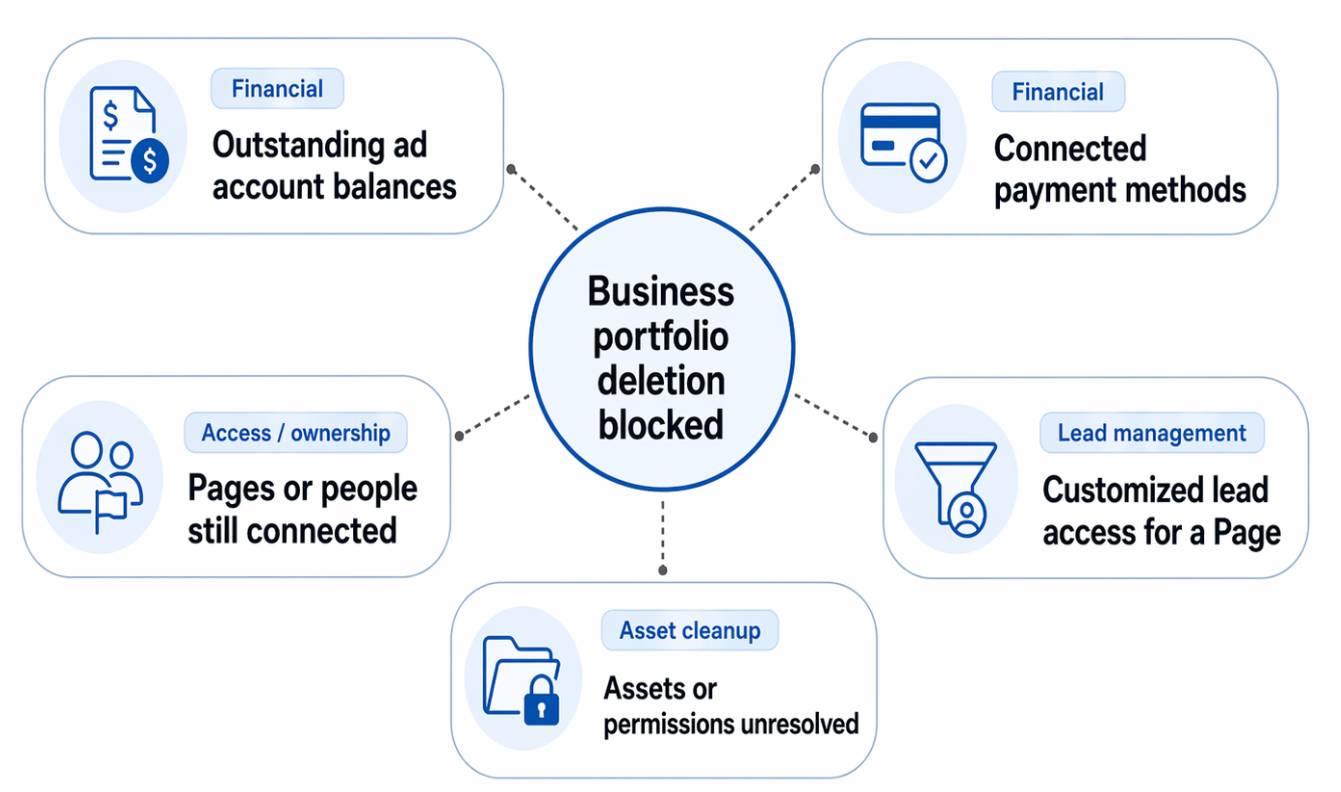
Meta may block business portfolio deletion when unresolved financial, access, asset, or lead-management dependencies remain connected to the account
The most common categories are:
- Outstanding ad account balances.
- Connected payment methods.
- Pages or people still connected to the business.
- Customized lead access for a Page.
- Assets or permissions that still need to be removed, reassigned, or resolved.
Meta’s guidance specifically says advertisers may need to reduce the number of Pages and people connected to the business. It also says that if customized lead access is turned on for a Page in the business portfolio, the portfolio cannot be deleted until someone with full control resolves it.
Why this matters for advertisers
A blocked deletion can expose a deeper account-structure problem.
If your business portfolio is hard to delete, it may also be hard to manage. That matters when you are running campaigns that require fast decisions, clean permissions, reliable lead routing, and clear reporting ownership.
For performance marketers, unclear account structure creates friction in several places:
- Who can edit campaigns?
- Who owns the Page used in ads?
- Which ad account should receive budget?
- Which Pixel or conversion source is connected?
- Who can access lead data?
- Which partner or agency still has permissions?
- Which business should control the campaign assets?
That friction can slow optimization. It can also cause teams to make poor media decisions, such as launching from a new account too quickly, duplicating assets unnecessarily, or abandoning useful audience data because the old structure feels messy.
If you are still deciding whether deletion is the right move, first read the companion guide on how to plan a safe Meta portfolio deletion.
Business impact of unresolved deletion blockers
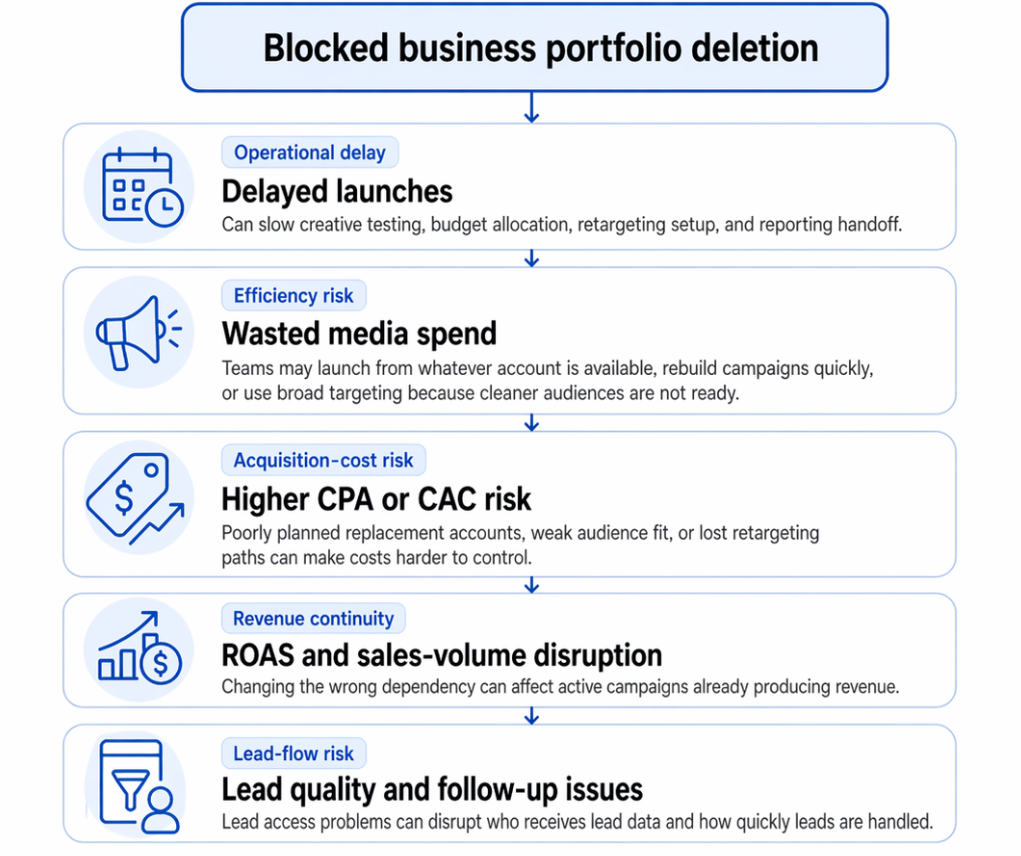
A blocked deletion is not just an admin issue; it can create launch delays, media inefficiency, acquisition-cost risk, revenue disruption, and lead-flow problems
Delayed launches
When a portfolio cannot be deleted, a new campaign structure may be delayed. This is especially painful for agencies onboarding clients, startups preparing a launch, or ecommerce teams trying to hit seasonal windows.
A blocked deletion can delay creative testing, budget allocation, retargeting setup, and reporting handoff.
Wasted media spend
When account structure is unclear, teams often compensate with speed. They launch from whatever ad account is available, rebuild campaigns quickly, or use broad targeting because cleaner audiences are not ready.
That can increase wasted impressions and weaken early campaign data.
Higher CPA or CAC risk
Blocked deletion does not automatically raise CPA or CAC. The risk comes from the decisions teams make around the blocker.
If the team rushes into a poorly planned replacement account, launches with weak audience fit, or loses access to proven retargeting paths, acquisition costs can become harder to control.
ROAS and sales-volume disruption
For ecommerce and sales-led teams, the risk is continuity. If the blocked portfolio is connected to active assets, removing or changing the wrong dependency can affect campaigns that are already producing revenue.
Even short delays can matter when campaigns are tied to product drops, appointment availability, seasonal offers, webinars, or limited-time promotions.
Lead quality and follow-up issues
Lead-generation teams need to pay special attention to customized lead access. If lead access settings are involved, deletion troubleshooting can affect who receives lead data and how quickly leads are handled.
A campaign can generate acceptable CPL but still fail commercially if leads do not reach the right sales process.
Typical scenarios where this applies
An agency is offboarding a client
The agency wants to delete an old business portfolio after the engagement ends. Meta blocks deletion because a Page, person, ad account, payment method, or lead access setting is still connected.
The risk is that the agency spends time cleaning up admin issues instead of handing off clean campaign documentation and asset ownership.
A startup created duplicate portfolios
A founder, contractor, and marketer each created a business portfolio while trying to set up Facebook and Instagram ads. Now the team wants one clean structure, but one of the duplicate portfolios cannot be deleted.
The risk is fragmented budgets, unclear ownership, and inconsistent campaign learning.
A B2B team uses lead ads
A B2B demand-generation team uses Meta lead forms for webinar signups, demo requests, or gated content. Customized lead access may be connected to the Page, blocking deletion.
The risk is lead-flow disruption. Before removing anything, the team should confirm how leads are routed and who needs access.
An ecommerce brand has old billing dependencies
A brand wants to clean up old ad accounts before scaling a new campaign structure. Meta blocks deletion because of billing or payment method dependencies.
The risk is delayed testing and confusion about which account should receive budget.
A local business wants to “start over”
A local business owner may want to delete a portfolio because the setup feels confusing. But if the Page, Instagram profile, or people access is still connected, deletion may fail.
The risk is removing useful assets instead of simply organizing them.
An affiliate or freelance marketer is cleaning old projects
Freelancers and affiliates often work across multiple offers, Pages, or client environments. A blocked deletion can indicate leftover access from previous campaigns.
The risk is operational clutter that increases the chance of launching ads from the wrong business or using the wrong asset identity.
For a prevention-first checklist, use the related guide on how to protect campaigns before deleting a business portfolio.
Risks and considerations before fixing blockers
Do not remove assets blindly just to make the delete button work.
A Page, person, lead access setting, or payment method may still support active campaigns or business operations. The goal is to resolve the blocker without breaking something valuable.
Check these risks first:
- Removing Page access may affect ad identity, comments, social proof, inbox workflows, or Instagram connectivity.
- Removing people may lock out agencies, contractors, or internal media buyers who still need access.
- Resolving lead access incorrectly may interrupt lead delivery or sales-team visibility.
- Changing payment methods may affect active campaigns or billing continuity.
- Creating a new ad account too quickly may fragment campaign history and make performance harder to compare.
- Deleting a portfolio does not fix weak targeting, poor creative, poor landing pages, or low-quality conversion signals.
Over-reliance on one platform can create operational fragility. Even if Meta is your primary acquisition channel, campaign planning should not depend on one account structure staying perfect forever.
Audience size also matters. If you rebuild campaigns after cleanup, do not rely only on tiny niche audiences unless your budget and conversion expectations match that constraint.
Prerequisites for resolving deletion blockers
Before troubleshooting, make sure the team has the basics in place.
- You need full control or access to someone who has full control of the business portfolio.
- You need visibility into active ad accounts, Pages, Instagram profiles, lead forms, people, partners, payment methods, and campaign activity.
- You need a clear decision on whether the portfolio should be deleted, merged into a cleaner structure, or simply left inactive.
- You need a campaign continuity plan for any active spend.
- You need a confirmed owner for every asset that will remain in use.
- You need reliable conversion tracking and lead-quality monitoring before launching campaigns from the cleaned-up structure.
- You need clear success metrics so that post-cleanup performance is judged correctly.
For paid social, success is not “the portfolio disappeared.” Success is that campaigns continue to run, leads continue to flow, and the team has a cleaner structure for testing and scaling.
Practical recommendations for advertisers
Diagnose the blocker before changing anything
Start by identifying the blocker category: billing, payment method, Page, people, lead access, ad account, or other connected asset.
Do not remove everything at once. That makes it harder to know what fixed the issue and what may have broken campaign workflows.
Prioritize revenue continuity
If an active campaign is producing sales or qualified leads, protect it first. Resolve deletion blockers around the campaign, not through it.
Pause only when necessary. Do not disrupt a working campaign because of a non-urgent cleanup task.
Check lead access carefully
For lead-generation advertisers, lead access settings deserve special attention. If a Page has customized lead access, confirm who receives leads, which CRM or workflow is involved, and whether sales follow-up depends on that configuration.
A deletion blocker may be annoying, but a broken lead flow is more expensive.
Clean up people and partners deliberately
Remove users who no longer need access, but confirm that current campaign owners still have the permissions required to manage ads, reporting, creative, and lead handling.
For agencies, document access changes during offboarding. For small businesses, make sure ownership does not depend on a former employee, contractor, or inactive profile.
Avoid unnecessary account resets
Creating a new ad account or portfolio may feel faster, but it can introduce new problems: fragmented reporting, duplicated assets, unclear ownership, and weaker continuity for testing.
Only rebuild when the old structure is genuinely unworkable.
Rebuild audiences before relaunching
If deletion or cleanup changes how campaigns are organized, prepare your next audience tests before you relaunch. Identify which segments should be rebuilt from warm traffic, social engagement, groups, competitor communities, or profile-based data.
Judge performance on downstream quality
After cleanup, do not evaluate campaigns only on CPC or CPL. Review lead quality, sales conversion, CAC, ROAS, meeting-show rate, purchase quality, or pipeline contribution.
A cleaner account structure is useful only if it supports better performance decisions.
Final takeaway
When Meta will not let you delete a business portfolio, the blocker is usually a sign that assets, access, billing, or lead settings still need attention. Resolve the operational issue carefully, protect active campaigns, and use the cleanup as an opportunity to rebuild paid social around clearer ownership and higher-quality audiences.
Join the free LeadEnforce trial period to test more precise audience segments before your next Meta campaign launch.