Agency onboarding often gets delayed by something simple: no one can find the Meta Business Portfolio ID.
For advertisers, this ID is more than an admin detail. It can be needed when agencies, partners, freelancers, or approved tools need to identify the correct business portfolio.
Meta describes the business portfolio ID as the number found under Settings → Business portfolio info, below the business portfolio name.
If your team cannot find or verify it quickly, campaign setup can slow down before any audience, creative, or budget decision is even made.
What is happening?
A business portfolio ID identifies a specific Meta Business Portfolio. It helps distinguish one business portfolio from another, especially when a company has multiple portfolios, agencies are involved, or a partner access workflow is required.
This matters because many advertisers have messy histories:
- One portfolio was created by a founder.
- Another was created by an agency.
- A third contains an old ad account.
- The current Page is connected somewhere else.
- The Instagram account is not where the media team expects it to be.
When a partner asks for the business portfolio ID, sending the wrong one can create access delays or confusion.
Meta’s help content for partner access also notes that business portfolio IDs can be found in Meta Business Suite settings.
Why this affects campaign performance
Finding the portfolio ID does not directly improve CPC, CPA, or ROAS. But it can remove a bottleneck between strategy and execution.
That matters most when timing is important.
If your agency is ready to launch prospecting campaigns, test new high-intent audiences, or rebuild a retargeting structure, access delays reduce testing speed. A week spent chasing the correct ID is a week not spent evaluating creative, audience quality, lead quality, or conversion rate.
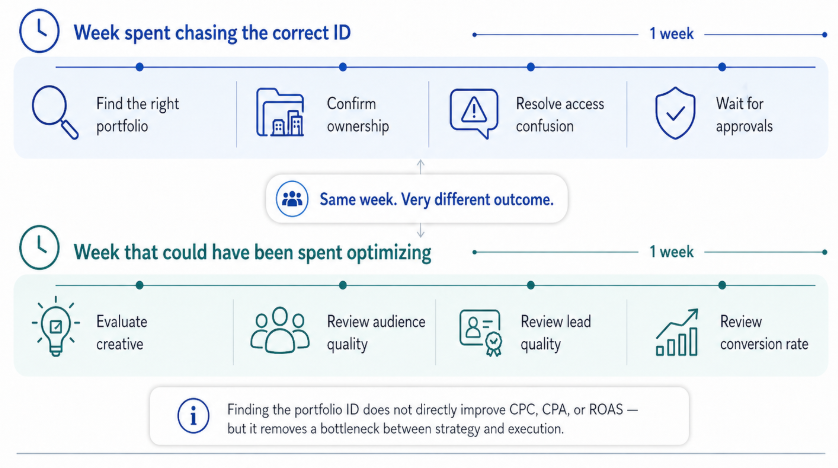
A one-week access delay can displace the work that actually improves campaign performance: testing creative, audiences, lead quality, and conversion behavior
For B2B lead-generation teams, this can be especially painful. A narrow audience test may already require careful budget planning and conversion tracking. Administrative delays reduce the amount of time available for real optimization.
Business impact
A missing or incorrect business portfolio ID can create several business problems:
- Slower agency onboarding.
- Delayed campaign launches.
- More back-and-forth between client and partner.
- Incorrect asset access.
- Confusion over which portfolio owns which Page or ad account.
- Delayed Custom Audience uploads or campaign testing.
- Wasted internal time on admin troubleshooting.
The financial impact is usually indirect. Campaigns may not spend inefficiently because of the ID itself, but the business loses speed, clarity, and execution discipline.
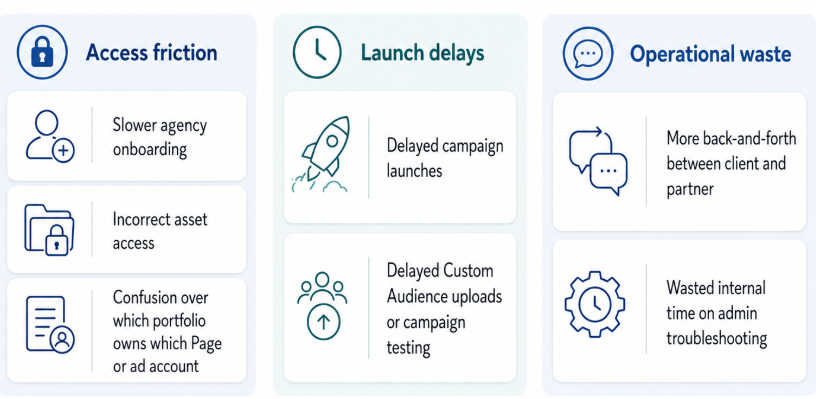
A missing or incorrect Meta Business Portfolio ID can create seven downstream problems, from agency onboarding delays to wasted internal troubleshooting time
In performance marketing, those are real costs.
Typical scenarios where this applies
An agency needs client access
The agency asks for the client’s business portfolio ID to request access or confirm the correct business. The client sends an old ID or cannot find it. Launch planning stalls.
If the client does not yet have a clean portfolio, point them to create the business portfolio before access requests.
A freelancer is taking over from a previous contractor
The business owner has access to the Page but does not know which business portfolio owns the ad account. The freelancer needs the correct ID before they can help untangle access.
A startup is moving from boosted posts to structured campaigns
The startup has been running simple campaigns from a Page. Now it wants proper prospecting, retargeting, and lead-generation campaigns. The team needs to identify the right business portfolio before building the new structure.
A B2B team wants to test precise audience segments
The team plans to test LinkedIn-derived professional audiences or social-profile-based segments. But before those audiences can be used properly, the right ad account and portfolio access must be clear.
An ecommerce brand has multiple portfolios
The brand may have one portfolio for the main store, another for a regional entity, and another created by an agency. The ID helps prevent teams from working in the wrong place.
Risks and considerations
Before sharing or using a business portfolio ID, advertisers should check:
- Correct portfolio: Make sure the ID belongs to the portfolio that owns the relevant assets.
- Correct assets: The portfolio should contain the Page, Instagram account, ad account, pixel, catalog, or other assets needed.
- Appropriate access level: Do not grant broader access than the partner actually needs.
- Current approver: Even with the right ID, the approval can stall if notifications go to the wrong person. Review keep portfolio contact info ready for approvals.
- Multiple portfolios: If several portfolios exist, verify naming and ownership before acting.
- Compliance and policy expectations: Sharing access does not remove the advertiser’s responsibility to follow platform policies.
- Campaign readiness: Access is only useful if the campaign objective, offer, tracking, and audience plan are ready.
A common mistake is treating access as the finish line. It is not. Access only makes campaign execution possible.
Prerequisites and dependencies
Before using the business portfolio ID in a performance marketing workflow, confirm:
- The business portfolio has been created.
- The relevant assets are inside the correct portfolio.
- The person handling access has the right permissions.
- The portfolio name is recognizable.
- The ad account is active and usable.
- Billing and campaign ownership are clear.
- The Page and Instagram account are connected where needed.
- Conversion tracking and success metrics are defined.
- The audience strategy is ready for testing.
This prevents the team from getting access to the wrong structure and then building campaigns on top of a messy foundation.
How LeadEnforce helps
LeadEnforce does not find or manage your Meta Business Portfolio ID. It helps advertisers improve the audience inputs used once access and setup are ready.
That distinction is important.
The portfolio ID helps partners and teams get into the right Meta structure. LeadEnforce helps marketers build more relevant audiences for that structure, using sources such as Facebook groups, Instagram followers and engagers, LinkedIn professional data, and custom social-profile data.
For example, an agency might use the portfolio ID to gain access to a client’s ad assets. Once access is approved, the agency can test LeadEnforce-built audiences against broader Meta targeting, retargeting pools, or lookalike-style expansion strategies.
This keeps the workflow practical:
- Confirm the correct business portfolio.
- Confirm the right assets.
- Build relevant audiences.
- Test against clear CPA, CAC, ROAS, or lead-quality goals.
Practical recommendations
Keep the ID in your onboarding checklist
Agencies should ask for the business portfolio ID early. Clients should know where it is stored internally.
Confirm the portfolio name before sharing the ID
If the business has multiple portfolios, do not rely on memory. Confirm the name, assets, and purpose of the portfolio before sharing the ID.
Pair access requests with asset requirements
Do not ask for generic access. Identify the assets needed for the campaign: ad account, Page, Instagram account, pixel, catalog, or reporting access.
Avoid using access as a substitute for strategy
Once access is solved, the real campaign work begins. Define audience segments, creative hypotheses, offer tests, conversion events, and budget rules.
Use precise audiences as part of a testing plan
If using LeadEnforce-built audiences, test them intentionally. Compare them against broader prospecting, retargeting, and existing customer segments. Judge by lead quality and conversion behavior, not just CPC.
Final takeaway
Your Meta Business Portfolio ID is a small detail that can create large delays when it is missing or wrong.
For performance marketers, the goal is not simply to find the ID. The goal is to remove access friction so campaign testing, audience building, and budget optimization can move faster.
Join the free 7-day LeadEnforce trial period to test more precise paid social audiences before committing more budget.