When marketers think about Meta campaign performance, they usually focus on audiences, bids, creative, and landing pages.
But outdated business portfolio contact information can quietly slow campaign execution.
Meta says advertisers can update the name and email address used for a business portfolio in Meta Business Suite, and that business portfolio email notifications use this email address.
For a performance team, that email address matters. It may be where important portfolio notifications, confirmations, access messages, or business-related alerts are sent. If it belongs to an old employee, a freelancer, or an inbox no one checks, your campaigns can stall for reasons that have nothing to do with media buying skill.
What is happening?
Inside Meta Business Suite, the “My info” section lets a portfolio user update their name or email address. Meta’s indexed help result describes the basic path as Business portfolio info → My info → Edit → update name or email → Save.
This is not the same as changing your legal business details, your Page name, or your ad account settings.
It is about the personal information associated with your business portfolio access.
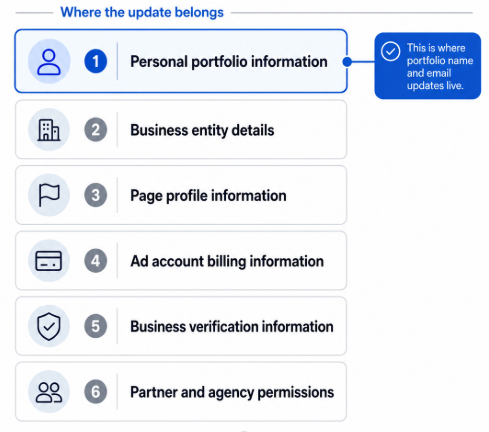
Meta business settings contain multiple layers. Updating portfolio contact information is a user-level task, not the same as changing business details, Page settings, billing, verification, or partner permissions
That distinction matters because many advertisers mix these layers together:
- Personal portfolio information.
- Business entity details.
- Page profile information.
- Ad account billing information.
- Business verification information.
- Partner and agency permissions.
When these layers are confused, teams waste time looking in the wrong place.
Why this affects campaign performance
Outdated contact information rarely causes poor CPC or CPA directly. But it can create operational friction that delays performance improvements.
For example, if your team is trying to launch a new lead-generation campaign, missing a portfolio notification can delay access, approvals, or administrative follow-up. If an agency is waiting for confirmation, the campaign may not launch on schedule. If a business owner no longer receives important account messages, avoidable problems can sit unresolved.
Performance marketing depends on speed. When your audience test is ready, your creative is approved, and your budget is allocated, you do not want the launch blocked by an old email address.
Business impact
The business impact of outdated portfolio contact info usually shows up as delays and missed signals.
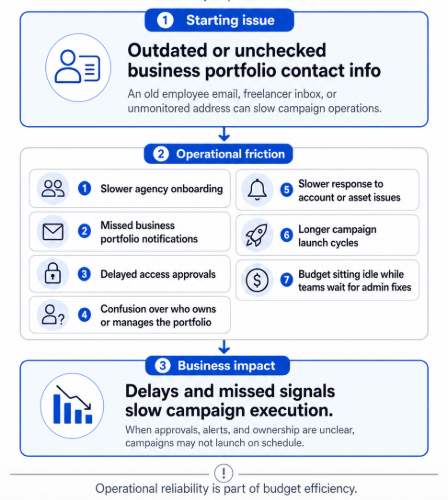
Outdated portfolio contact details can trigger a chain of operational delays, from missed notifications and access approvals to longer launch cycles and idle budget
Advertisers may experience:
- Slower agency onboarding.
- Missed business portfolio notifications.
- Delayed access approvals.
- Confusion over who owns or manages the portfolio.
- Slower response to account or asset issues.
- Longer campaign launch cycles.
- Budget sitting idle while teams wait for admin fixes.
For agencies, this can damage client trust. For startups, it can slow a launch window. For SMBs, it can turn a simple campaign update into a multi-day back-and-forth.
If your portfolio itself is not yet cleanly structured, start with creating the business portfolio before campaign scaling. Contact info is important, but it works best when the underlying portfolio is already organized.
Typical scenarios where this applies
A founder used a personal email during setup
Many business portfolios are created quickly, often with the founder’s personal email. Later, the marketing team grows, but important business notifications still go to an inbox that is rarely checked.
A former employee created the portfolio
This is common in SMBs and startups. A marketing coordinator, contractor, or early employee created the portfolio, then left. The current team can run some campaigns but struggles with ownership, alerts, and approvals.
An agency inherits an unclear setup
The agency needs access, but the business owner does not know which email receives portfolio notifications. This delays approvals and increases onboarding friction.
This scenario often overlaps with finding the Meta Business Portfolio ID for agency and partner access.
A freelancer manages multiple clients
Freelancers often work across several business portfolios. If their name or email is outdated, clients may not know who is actually managing access or receiving messages.
A business changes its operating email
The company moves from a founder inbox to a shared marketing or operations inbox. If the portfolio information is not updated, the team may keep missing business-critical messages.
Risks and considerations
Updating contact information is useful, but advertisers should avoid treating it as a cure-all.
Check these risks first:
- Changing contact info does not fix poor permissions. A person may have the correct email but still lack access to the right assets.
- Personal info is different from verified business details. If your business name, address, phone, or website changed, review business details that affect verified status.
- A shared inbox needs ownership. A shared marketing inbox is helpful only if someone is accountable for checking it.
- Too many admins create risk. More access does not always mean better collaboration.
- Admin cleanup should not happen during a chaotic launch. Review access before major budget increases.
- Do not ignore creative and audience quality. Clean contact info makes operations smoother, but it does not improve lead quality by itself.
Prerequisites and dependencies
Before changing business portfolio contact info, make sure you know:
- Who currently has portfolio access.
- Which email should receive business notifications.
- Whether the new email is actively monitored.
- Whether the user can confirm or receive required emails.
- Whether the portfolio contains the correct ad account, Page, and Instagram account.
- Whether agencies or freelancers need access.
- Whether separate business details also need review.
- Which team member is responsible for account hygiene.
For larger teams, document this. A simple ownership note can prevent future confusion when campaigns, agencies, or team members change.
How LeadEnforce helps
LeadEnforce does not manage Meta contact information. It helps marketers make better use of their paid social setup once the administrative layer is stable.
When contact info is current, the team can move faster from audience strategy to execution. That matters when you are testing LeadEnforce-built audiences from Facebook groups, Instagram followers or engagers, LinkedIn-derived professional data, or custom social-profile sources.
A clean admin setup helps the right marketer receive the right notifications and act quickly. A better audience strategy helps that marketer test more relevant audience pools instead of relying on broad targeting guesswork.
Together, those two pieces support faster experimentation: fewer admin delays and more focused audience inputs.
Practical recommendations
Use a business email, not a throwaway inbox
Choose an email that will still be available if one person leaves. For many teams, a monitored role-based email works better than an individual personal address.
Separate user info from business details
Do not confuse “My info” with legal business details. If the company rebrands, changes domain, moves address, or updates its website, that is a different review path.
Audit contact info before major launches
Before launching a new funnel, seasonal campaign, lead-generation push, or agency engagement, confirm the portfolio contact details are current.
Align contact ownership with campaign ownership
If the paid social lead is responsible for campaign operations, they should know who receives portfolio notifications and how to respond.
Connect admin hygiene to testing velocity
The purpose of clean contact info is not bureaucracy. The purpose is faster action. When a campaign issue appears, the right person should know quickly so the team can protect spend and keep testing.
Final takeaway
Accurate Meta Business Portfolio contact info will not make weak ads perform better. But it can prevent campaign delays, missed notifications, and access confusion that slow down performance work.
For advertisers, operational reliability is part of budget efficiency.
Join the free 7-day LeadEnforce trial period to test more precise paid social audiences before committing more budget.