Before you test new Facebook or Instagram audiences, scale budgets, or bring an agency into your ad account, your Meta Business Portfolio needs to be set up correctly.
A business portfolio is the structure that brings key Meta assets together. Meta describes it as a way to manage assets such as Facebook Pages, Instagram accounts, and ad accounts in one place through Meta Business Suite.
For advertisers, that matters because campaign performance is not only shaped by targeting and creative. It is also shaped by whether the right people can access the right assets, whether the correct ad account owns the campaign, and whether the right Page, Instagram account, pixel, and audience assets are connected before spend begins.
What is happening?
A Meta Business Portfolio acts as the organizational layer for your Meta advertising assets. After creating a portfolio, advertisers can add business assets such as Facebook Pages, Instagram accounts, ad accounts, apps, and Meta Pixels. Meta’s help content also notes that business assets can belong to only one business portfolio.
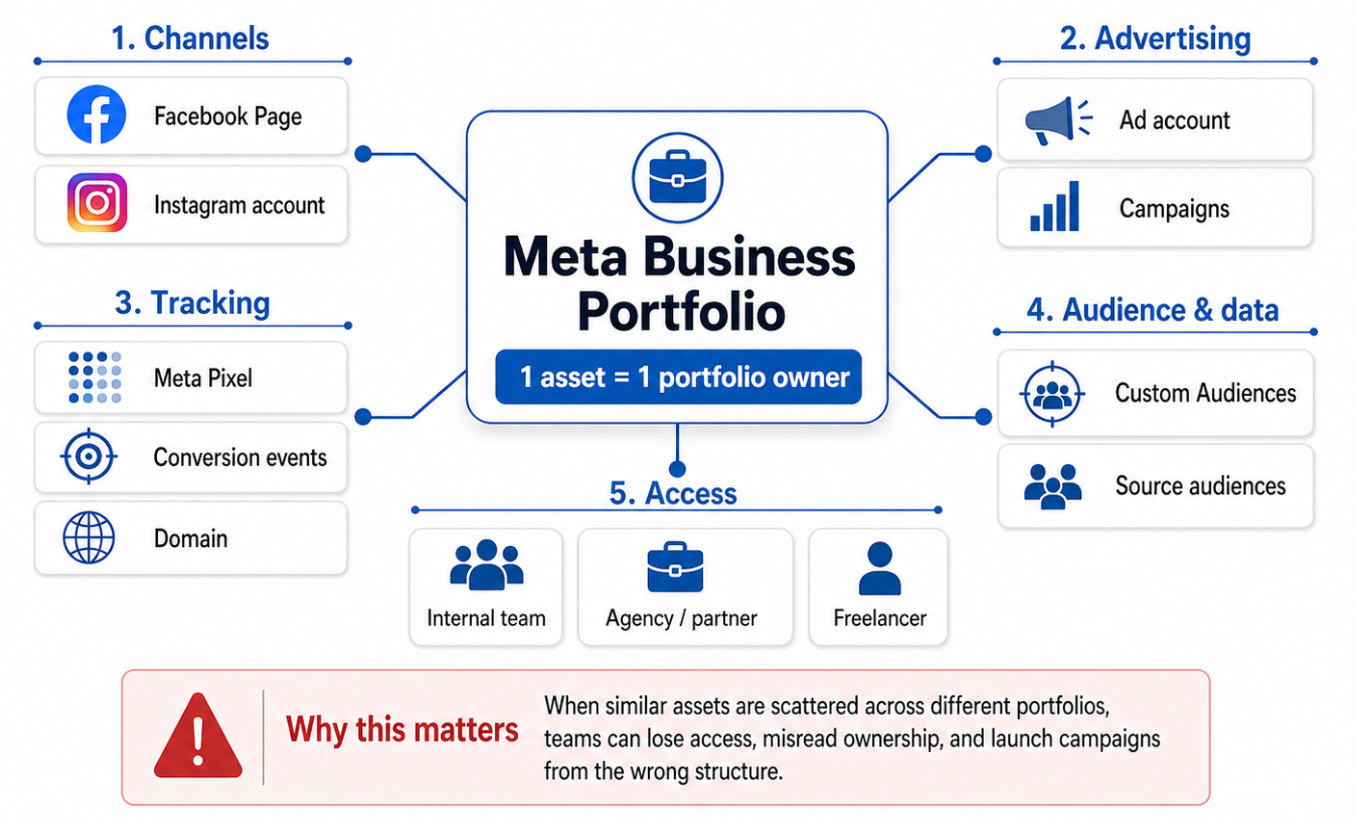
Meta assets should have one clear portfolio owner. A business portfolio organizes Pages, Instagram accounts, ad accounts, pixels, audiences, people, and partners so campaigns can launch from the correct structure
For small advertisers, this may sound administrative. For performance teams, it is campaign infrastructure.
A messy setup can create practical problems:
- An agency cannot access the right ad account.
- A founder, former employee, or old freelancer still controls an important asset.
- The Facebook Page and Instagram account used in ads are not connected to the right portfolio.
- Pixel or data-source ownership is unclear.
- Campaigns are launched from the wrong ad account.
- Audience testing gets delayed because the team cannot find or share the correct assets.
None of these issues automatically changes Meta’s auction mechanics. But they can slow execution, reduce testing velocity, and cause budget to be spent before the campaign foundation is stable.
Why this affects campaign performance
Paid social performance depends on clean execution. When your portfolio is disorganized, the team spends time fixing access and ownership instead of testing audiences, creative, offers, and landing pages.
That can affect performance in several ways.
First, campaign learning can become harder to interpret. If campaigns are spread across multiple ad accounts or launched from the wrong structure, your team may compare performance across inconsistent setups.
Second, audience testing slows down. A growth team that wants to test a LeadEnforce-built audience against a broader Meta audience needs the right ad account, Page, pixel, and Custom Audience access ready before launch.
Third, decision-making becomes less reliable. If multiple portfolios contain similar assets, marketers may misread which account owns the campaigns, which audiences are being used, or which conversion data should guide optimization.
Business impact
A poor portfolio setup can contribute to wasted budget even when the media strategy is sound.
The impact usually appears as operational waste rather than a single visible metric. Teams may see:
- Higher effective CPA because campaigns launch late or under the wrong setup.
- Slower creative and audience testing cycles.
- Wasted impressions from campaigns tied to the wrong Page or ad account.
- Confusion over which pixel or audience source should be used.
- Delayed agency onboarding.
- Weaker budget allocation because reporting is fragmented.
- Reduced confidence in campaign results.
For startups and SMBs, this can be especially costly. If the monthly ad budget is limited, every delayed test matters. If an agency spends the first week untangling access, that is time not spent improving lead quality, conversion rate, or sales volume.
Typical scenarios where this applies
A startup launching paid social for the first time
A founder creates a Page, an Instagram account, and an ad account separately. Campaigns begin before ownership is organized. Later, the team wants to add a performance marketer, upload Custom Audiences, or test LeadEnforce-generated audiences, but no one is sure which asset belongs where.
An agency onboarding a new Meta Ads client
The agency asks for access, but the client has multiple portfolios, old ad accounts, or assets owned by a previous contractor. Before campaign strategy can move forward, the client needs a clean portfolio structure.
For this situation, the next useful read is Find Your Meta Business Portfolio ID Faster When Agencies, Partners, or Tools Need Access.
A B2B lead-generation team testing niche audiences
A B2B advertiser wants to test audiences based on LinkedIn professional data, relevant Facebook groups, or competitor-community signals. Those audiences are only useful if the ad account, conversion event, and campaign objective are ready to support a clean test.
An ecommerce brand connecting Meta assets
An ecommerce team may need its Page, Instagram account, ad account, catalog, pixel, and domain aligned. If the foundation is scattered, dynamic ads, retargeting, and prospecting tests can become harder to manage.
A local business working with a freelancer
The business owner may have boosted posts from a Page for years, but there is no structured portfolio. When a freelancer tries to run proper campaigns, asset access becomes the bottleneck.
Risks and considerations
Creating a business portfolio is not the same as having a strong advertising strategy.
Advertisers should check several risks before scaling:
- Poor audience fit: A clean portfolio will not fix broad, weak, or irrelevant targeting.
- Too-small audiences: Highly precise audiences can perform well, but they need enough size for meaningful delivery and testing.
- Weak creative: Even a high-intent audience will underperform if the ad does not speak to the buyer’s problem.
- Poor landing pages: A strong audience cannot overcome a confusing offer or slow conversion path.
- Unclear ownership: Assets should belong to the business, not a random personal account or former contractor.
- Over-reliance on one channel: Meta Ads may be important, but B2B and growth teams should still think across channels.
- Misread metrics: CPC may look attractive while lead quality is poor. CPA may look high while sales-qualified leads are improving.
Meta also notes that new portfolios or ad accounts may not immediately have access to all advertising features, depending on platform requirements.
Prerequisites and dependencies
Before your portfolio setup supports serious campaign testing, make sure you have:
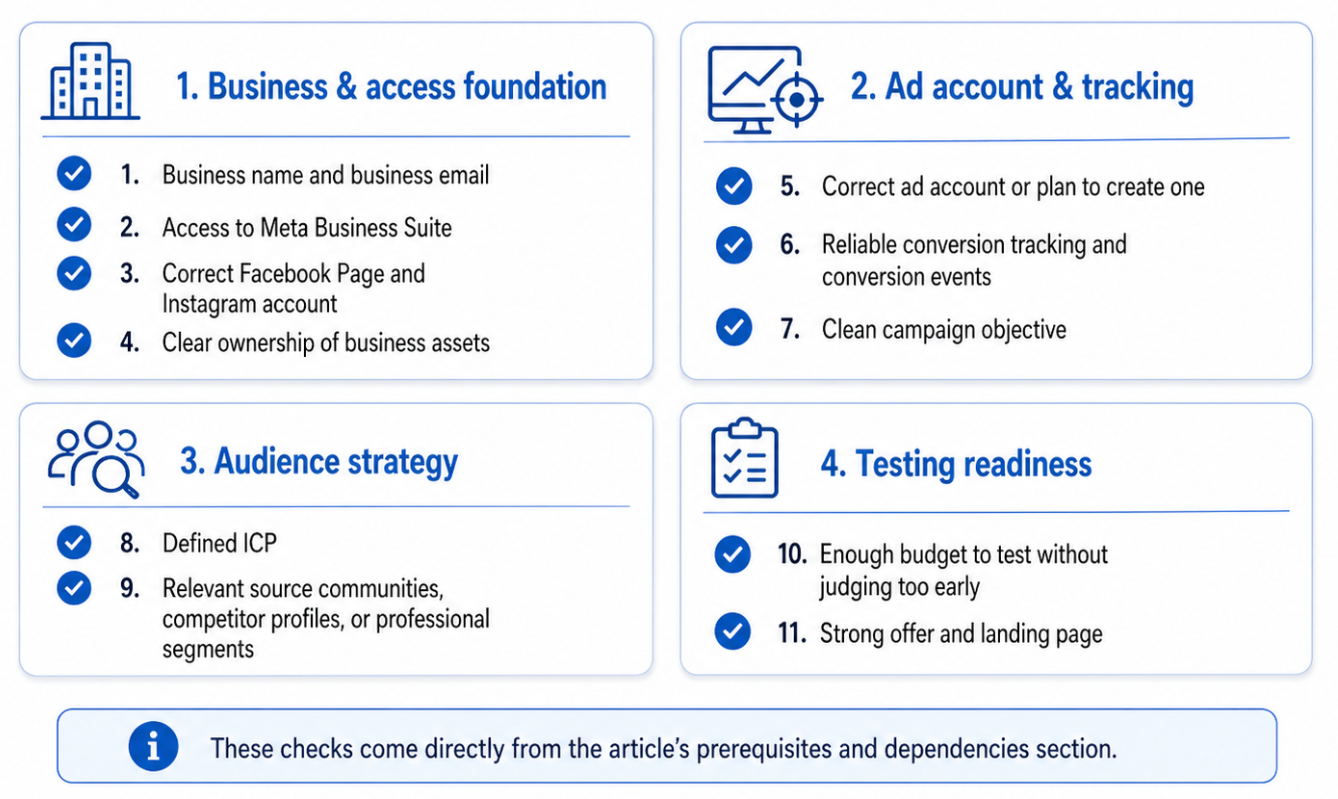
Before scaling Meta spend, check the campaign foundation. The article identifies 11 prerequisites across access, ownership, tracking, audience strategy, budget, and landing-page readiness
- A clear business name and business email.
- Access to Meta Business Suite through the appropriate Facebook profile or managed Meta account.
- The correct Facebook Page and Instagram account.
- The correct ad account or a plan to create one.
- Clear ownership of business assets.
- Reliable conversion tracking and conversion events.
- A clean campaign objective.
- A defined ICP.
- Relevant source communities, competitor profiles, or professional segments for audience research.
- Enough budget to test audiences without judging performance too early.
- A strong offer and landing page.
This is also the right time to review portfolio contact info that keeps campaign notifications visible, because setup problems often become notification problems later.
How LeadEnforce helps
LeadEnforce does not replace Meta Business Portfolio setup. It helps once that setup is ready to support better audience testing.
Instead of relying only on broad targeting or generic interest stacks, advertisers can use LeadEnforce to build more relevant audiences from sources such as Facebook groups, Instagram profiles, followers and engagers, LinkedIn professional data, and custom social-profile data.
That is especially useful when the portfolio is properly organized because the team can move faster from audience discovery to campaign testing.
For example, a B2B SaaS advertiser might build audiences around professionals connected to relevant LinkedIn signals. An ecommerce brand might test audiences derived from Instagram competitor engagers. A local business might identify high-intent Facebook communities related to its service area or buyer problem.
The business portfolio provides the operational structure. LeadEnforce improves the quality and relevance of the audiences used inside that structure.
Practical recommendations
Start with an asset audit
List every Facebook Page, Instagram account, ad account, pixel, catalog, and domain your business uses. Confirm which portfolio owns each asset.
Decide who should have access
Avoid giving broad access to everyone. Separate owners, internal marketers, freelancers, and agencies. Give people the access they need to do their job, not more by default.
Keep campaign structure simple at first
Before scaling, use a clean testing structure. Separate prospecting, retargeting, and existing-customer campaigns where relevant. This makes audience performance easier to interpret.
Prepare audiences before spend increases
Do not wait until the campaign is live to decide who you are targeting. Define your ICP, source communities, competitor audiences, and retargeting pools before launch.
Connect setup to performance decisions
A correct portfolio setup is not the goal. Better campaign execution is the goal. Use the setup to improve testing speed, reduce access friction, and make budget decisions with cleaner data.
Final takeaway
A Meta Business Portfolio is not just an admin container. For advertisers, it is the foundation that determines whether Pages, Instagram accounts, ad accounts, pixels, people, partners, and audiences can work together without constant friction.
Set it up before you scale, then use better audience inputs to improve campaign relevance and budget efficiency.
Join the free 7-day LeadEnforce trial period to test more precise paid social audiences before committing more budget.