At some point, almost every business running Facebook or Instagram ads needs to give someone access to its Facebook Page.
It might be a freelance media buyer, an agency, a social media manager, a virtual assistant, a growth lead, or a creative contractor. The mistake is treating Page access as a password-sharing problem.
It is not.
Proper Facebook Page access lets someone work on the Page without using the owner’s personal login. For advertisers, that protects the business while helping campaigns move faster.
What Is Happening When You Give Someone Page Access?
Giving someone access to a Facebook Page allows that person to help manage the Page or specific Page-related tasks.
Depending on the setup, this may involve Facebook access, task access, partial access, or full control. The exact access model may differ depending on whether the Page is managed directly or as part of a business portfolio.
For advertisers, the main distinction is simple: the person should receive the access they need to do the job, not your personal login and not unnecessary control.
A media buyer may need to run ads using the Page. A content manager may need to publish posts. A community manager may need to respond to comments or messages. An analyst may only need visibility.
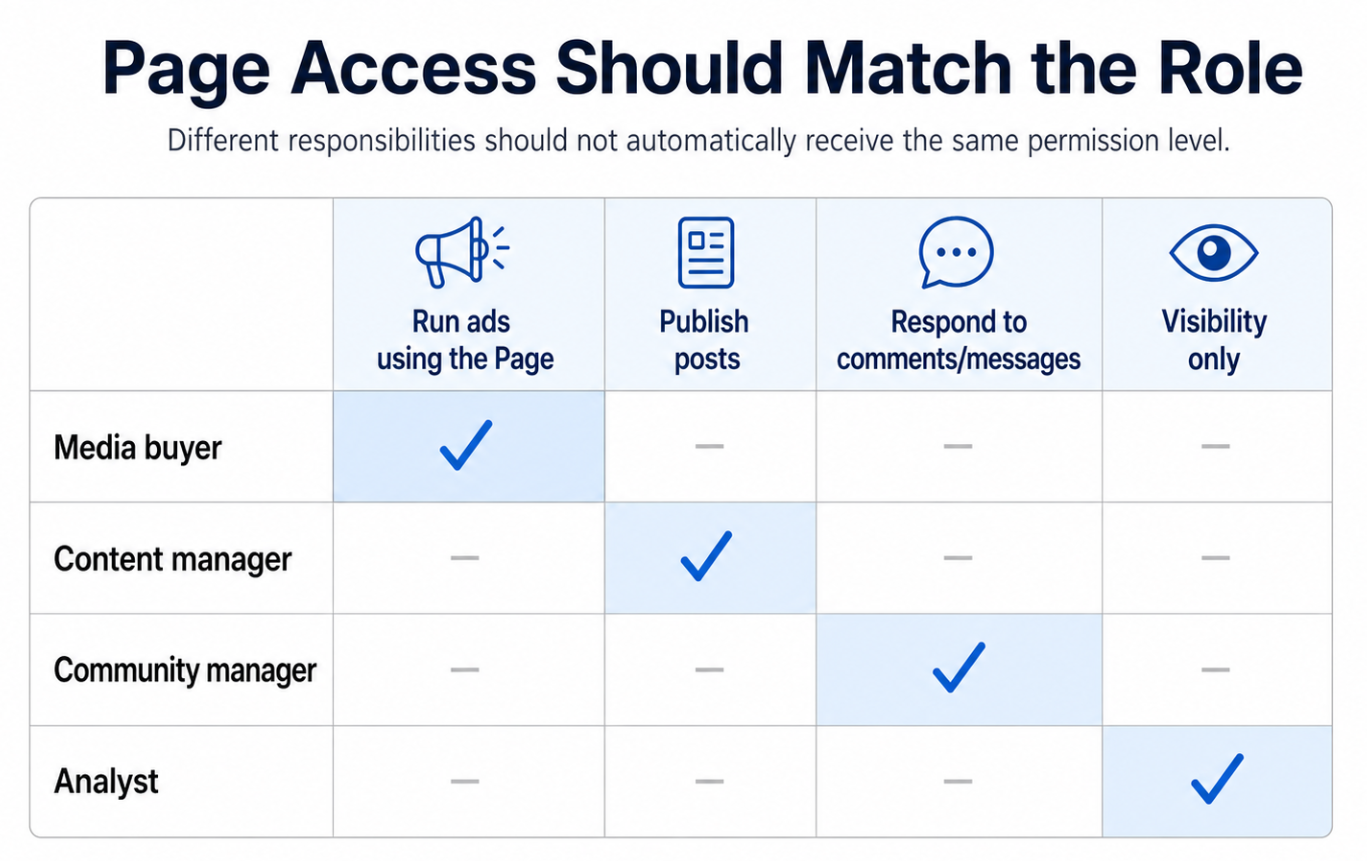
Different Page-access roles require different permissions. A media buyer, content manager, community manager, and analyst should not automatically receive the same level of control
Those are different responsibilities. They should not automatically receive the same permission level.
Why This Affects Campaign Performance
Page access affects performance because it affects execution.
If the right person cannot access the Page, campaigns may be delayed. Ads may not launch on time. Comments may go unmanaged. Creative testing may slow down. Lead follow-up may be less coordinated.
If the wrong person has too much access, the business creates avoidable risk. A contractor could change Page settings, remove users, publish content outside the campaign plan, or remain connected after the engagement ends.
Poor access structure also creates reporting confusion. If campaigns are launched from the wrong Page or managed by people without clear responsibilities, it becomes harder to diagnose what is driving performance.
For paid social teams, access should support speed and accountability. You want the campaign team to move quickly, but you also want a clear record of who can do what.
Business Impact
The business impact of Page access problems is usually indirect but real.
Campaign launches can be delayed while the owner tries to add the right person. This slows learning and pushes back revenue opportunities.
Optimization can become slower because every small change depends on someone with access. That hurts testing velocity.
Ad spend can become less efficient if campaigns are launched through the wrong Page, with weak coordination between paid and organic messaging, or with poor comment management.
Lead quality can suffer when the Page identity does not match the offer or when prospects ask questions in comments and nobody responds.
CAC and CPA can increase when the team wastes budget testing under messy conditions instead of isolating audience, creative, and funnel variables.
The access setup will not make a bad campaign good. But a poor setup can make a promising campaign harder to run, measure, and improve.
Typical Scenarios Where This Applies
A small business owner hires a freelancer
The freelancer needs to run ads and manage Page-related campaign tasks. The owner should grant appropriate access rather than sharing a personal Facebook password.
A startup founder brings in a growth marketer
The founder may own the Page, but the growth marketer needs access to test audiences, review engagement, and coordinate campaign launches.
A local service business works with a social media manager
The manager may need to publish content and respond to messages, but not control every business asset.
A B2B company gives access to a demand generation specialist
The specialist may need Page access for LinkedIn-derived audience tests, Facebook lead ads, or retargeting campaigns. That does not automatically mean they need full control.
An ecommerce brand hires a creative contractor
The contractor may need to understand Page identity and ad comments, but may not need access to billing, catalog settings, or broader asset control.
Risks and Considerations
The biggest risk is sharing logins. Password sharing creates security and accountability problems. It can also make offboarding difficult if the working relationship ends.
Another risk is giving full control when partial access would work. Full control can be useful in some situations, but it should not be the default.
A third risk is assuming Page access equals ad account access. A person may be able to manage the Page but still be unable to launch campaigns, use datasets, manage catalogs, or activate custom audiences.
A fourth risk is ignoring the broader business structure. If the Page should be managed through a business portfolio, direct Page access may only solve part of the problem.
A fifth risk is overvaluing access while undervaluing fundamentals. The person with access still needs a strong offer, relevant audience, reliable tracking, persuasive creative, and a landing page that converts.
Advertisers should also be careful with compliance. If the person receiving access will use custom audiences or audience tools, make sure they understand platform requirements and internal data standards.
Prerequisites and Dependencies
Before giving someone Page access, clarify:
- Who the person is and why they need access.
- Whether they need direct Page access, business portfolio access, or partner access.
- Which tasks they need to perform.
- Whether partial access is enough.
- Whether they also need ad account, Instagram, dataset, catalog, or lead form access.
Facebook Page access may not be enough for campaign execution. Advertisers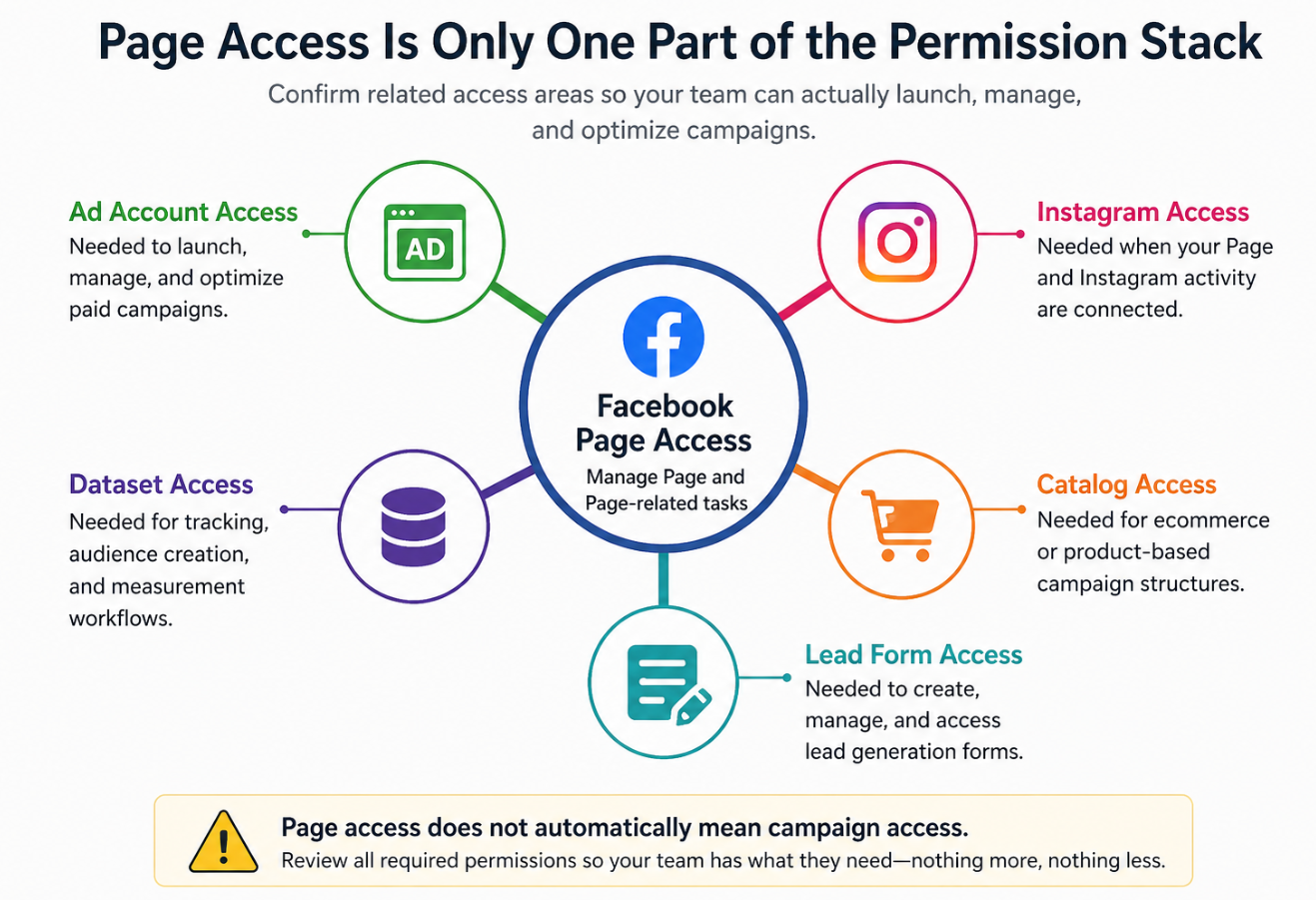 should confirm whether the person also needs access to the ad account, Instagram, dataset, catalog, or lead forms
- What campaign objective they are supporting.
- What success metrics matter.
- How access will be reviewed or removed later.
You should also have a clear campaign plan. Access is only useful when the person knows what they are supposed to accomplish.
How LeadEnforce Helps
LeadEnforce helps the person with access make better audience decisions once campaign execution is possible.
If a freelancer or agency has the right Page and ad account permissions, they can use LeadEnforce to build more precise ad audiences from Facebook groups, Instagram followers and engagers, LinkedIn professional data, and custom social-profile sources.
This is especially useful when the business wants to avoid broad targeting guesswork.
For example, a local business can test audiences based on relevant community groups. A B2B team can build segments around professional profiles or niche industry communities. An ecommerce brand can test audiences based on competitor Instagram ecosystems or high-intent social engagement.
LeadEnforce does not grant Page access, manage permissions, or fix tracking. It helps improve the quality and relevance of the audiences that marketers test after access is in place.
Practical Recommendations
Do not share personal logins. Use the appropriate Facebook or Meta access method instead.
Grant access based on the role. A media buyer, social manager, analyst, and contractor do not need the same permissions.
Use partial access where possible. Full control should be limited to trusted users who genuinely need it.
Separate Page access from ad account access. Confirm both if the person is responsible for paid campaigns.
Document access decisions. Keep a simple record of who was added, what they can access, and why.
Review access regularly. Remove former contractors, employees, or agencies after their work ends.
Align access with the campaign plan. If the person is testing LeadEnforce-built audiences, make sure they can activate those audiences in the correct ad account and Page structure.
Final Takeaway
Giving someone Facebook Page access should make campaign execution faster, not riskier.
The best setup avoids password sharing, gives each person only the access they need, and supports cleaner paid social testing. When access is handled properly, marketers can focus less on permissions and more on audience quality, creative performance, and conversion outcomes.
Related LeadEnforce Articles
- Business Asset Permissions in Meta: Why Access Structure Impacts Campaign Performance — Explains how permission choices affect campaign control and performance.
- Meta Business Portfolio Roles: How Access Structure Slows Down Campaign Execution — Helpful for understanding role-based access issues that slow down campaigns.
- How to Add People to Your Meta Business Portfolio — Relevant if the business should manage access through a structured portfolio.
- How to Give an Agency Partner Access to Meta Assets Without Losing Campaign Control — Useful when the person receiving access is an agency or external partner.
- Why Your Meta Business Portfolio Setup Affects Paid Social Performance — Explains why business structure matters for testing, permissions, and campaign efficiency.