
Broad prospecting is inefficient. According to HubSpot, 61% of marketers say generating traffic and leads is their biggest challenge, yet highly targeted campaigns produce significantly higher engagement rates than mass outreach. Additionally, Salesforce reports that segmented campaigns can drive up to 760% increase in revenue compared to non-segmented approaches.
Industry-specific prospecting lists allow sales and marketing teams to align messaging with sector-specific pain points, compliance requirements, buying cycles, and decision-making structures. The result is better conversion rates, improved deliverability, and stronger pipeline velocity.
This article outlines a structured methodology for building precise, scalable industry-focused prospecting lists.
1. Define the Industry With Precision
Start by narrowing the target industry beyond broad categories.
Instead of:
-
"Healthcare"
Define:
-
Private multi-location dental practices (11–50 employees)
-
Telehealth SaaS providers (Series A–C)
-
Medical device manufacturers (FDA Class II)
Use firmographic attributes such as:
-
NAICS/SIC codes
-
Employee count
-
Annual revenue
-
Geographic footprint
-
Ownership structure (private, public, PE-backed)
The more precisely you define the vertical, the more relevant your outreach becomes.
2. Identify Industry-Specific Buying Signals
Each industry has distinct buying triggers. Understanding these allows you to prioritize accounts most likely to convert.
Examples of industry signals:
-
Healthcare: Regulatory updates, new clinic openings, EHR migrations
-
SaaS: Funding rounds, product launches, hiring surges in sales
-
Manufacturing: Facility expansion, supply chain partnerships, automation investments
-
Financial services: M&A activity, compliance deadlines
Companies experiencing growth or structural change are significantly more responsive to outreach. Research shows that businesses undergoing expansion are up to 50% more likely to invest in new solutions.
Segment your list by these signals to improve timing and personalization.
3. Build Detailed Account Filters
Once the vertical is defined, refine your account selection criteria.
Core filtering dimensions include:
Firmographics
-
Industry classification
-
Company size
-
Revenue range
-
Location
Technographics
-
Software stack
-
CRM usage
-
Marketing automation tools
-
E-commerce platforms
Growth Indicators
-
Hiring velocity
-
Headcount growth rate
-
Funding stage
-
Website traffic growth
Combining firmographic and technographic data increases targeting precision and reduces wasted outreach volume.
4. Map the Correct Decision-Makers
Industry-specific lists require role alignment. Titles differ significantly across verticals.
For example:
-
Manufacturing: Director of Operations, Plant Manager
-
Healthcare: Practice Administrator, Chief Medical Officer
-
SaaS: VP of Revenue, Head of Growth
-
Logistics: Supply Chain Director
According to Gartner, buying groups now include 6–10 stakeholders on average. Focusing on a single contact reduces your likelihood of closing enterprise deals.
Create multi-threaded contact lists within each account:
-
Economic buyer
-
Technical evaluator
-
Operational influencer
This approach increases meeting booking rates and deal progression.
5. Segment by Sub-Industry Challenges
Within any vertical, sub-industries face distinct pain points.
Example in retail:
-
DTC brands prioritize paid acquisition efficiency.
-
Brick-and-mortar chains focus on foot traffic and inventory turnover.
-
Marketplace sellers concentrate on margin optimization.
Segmenting lists by operational challenges allows for hyper-relevant messaging.
Campaigns tailored to specific pain points generate up to 2x higher engagement compared to generic vertical messaging.
6. Validate and Enrich Data
List accuracy directly impacts deliverability and performance. Inaccurate contact data leads to bounce rates, sender reputation damage, and wasted sales effort.
Industry benchmarks show that B2B databases decay at approximately 2–3% per month due to job changes and company updates.
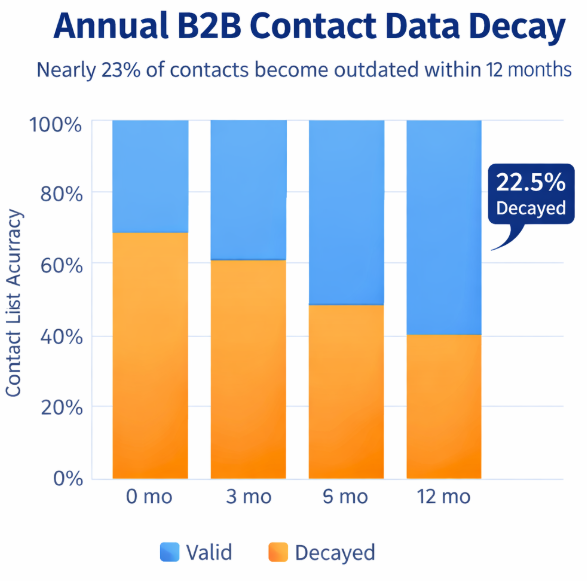
Annual B2B Contact Data Decay: Nearly 23% of contacts become outdated within 12 months
Best practices:
-
Verify email validity
-
Remove duplicate accounts
-
Confirm active domains
-
Enrich missing fields such as LinkedIn URL, department, and seniority level
Clean data ensures consistent campaign performance and protects domain health.
7. Create Tiered Prospecting Lists
Not all accounts within an industry have equal potential.
Develop tiered segmentation:
-
Tier 1: High-revenue, fast-growing accounts
-
Tier 2: Mid-sized stable companies
-
Tier 3: Smaller or early-stage businesses
This structure allows for resource allocation optimization:
-
Personalized outreach for Tier 1
-
Semi-automated campaigns for Tier 2
-
Scalable automation for Tier 3
Tiering increases sales efficiency and aligns effort with expected deal size.
8. Continuously Optimize List Performance
List building is not a one-time activity.
Track metrics such as:
-
Open rates
-
Reply rates
-
Positive response rates
-
Meeting conversion
-
Pipeline value per segment
Remove underperforming segments and double down on high-converting sub-industries. Data-driven iteration improves prospecting ROI over time.
Conclusion
Industry-specific prospecting lists drive measurable improvements in engagement, conversion rates, and sales efficiency. By combining precise vertical definition, signal-based targeting, multi-threaded contact mapping, and ongoing optimization, sales teams can move from generic outreach to strategic account acquisition.
In competitive B2B markets, precision is no longer optional. It is a performance requirement.