Lead forms sit at the core of demand generation. Whether embedded on landing pages, gated content assets, demo requests, or contact pages, forms directly impact conversion rates, cost per lead (CPL), and pipeline velocity. Even marginal improvements in completion rates can produce disproportionate gains in revenue performance.
Industry research shows that the average landing page conversion rate across industries ranges between 2% and 5%, while high-performing pages convert at 10% or more. Meanwhile, form abandonment rates frequently exceed 60%. These statistics indicate significant room for optimization.
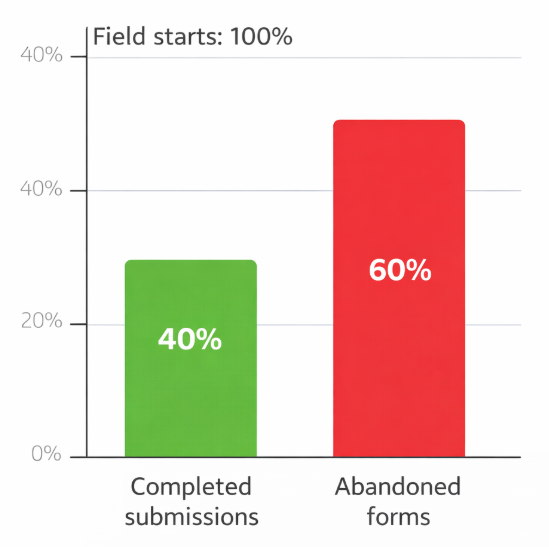
Form abandonment rates significantly outweigh completed submissions in typical landing page forms
This article examines structural, psychological, and technical optimization tactics that materially improve lead form performance.
1. Reduce Cognitive Load and Field Friction
Limit the Number of Fields
Data consistently shows a negative correlation between the number of form fields and completion rate. Studies indicate that reducing fields from 11 to 4 can increase conversions by up to 120% in some scenarios. Each additional field introduces friction, increases perceived effort, and raises abandonment probability.
Prioritize only mission-critical data:
-
Work email
-
Company name
-
Role or job title
-
Primary business need
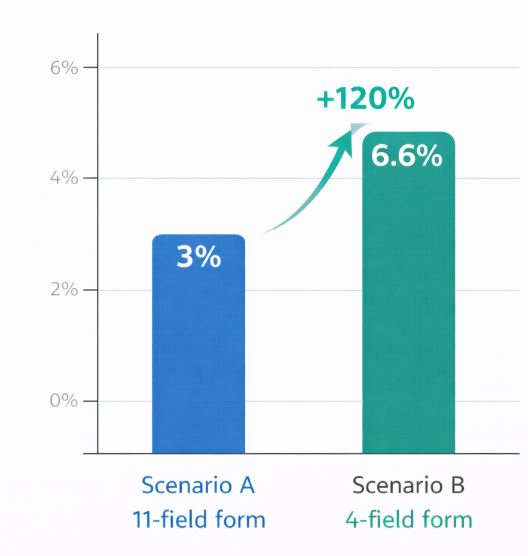
Comparison of conversion performance between long and short lead forms
Non-essential enrichment fields should be deferred or collected progressively.
Use Progressive Profiling
Instead of collecting all information at once, progressive profiling captures incremental data over multiple interactions. This approach reduces first-touch friction while maintaining data depth over time.
2. Align Form Length with Offer Value
The perceived value of the offer determines tolerance for friction. A short newsletter signup should require minimal information. A high-value gated industry report or demo request can justify additional qualification fields.
When friction is proportional to value, users are less likely to abandon the form. Misalignment, however, leads to drop-off.
3. Optimize Field Design and UX Mechanics
Single-Column Layouts
Single-column forms typically outperform multi-column formats due to clearer visual flow and reduced scanning complexity. They guide users step-by-step and reduce confusion.
Inline Validation
Real-time validation reduces frustration by immediately flagging errors (e.g., invalid email format). This prevents users from completing the entire form only to encounter multiple error messages at submission.
Smart Defaults and Autofill
Browser autofill and smart defaults accelerate completion. When users can complete a form in under 30 seconds, completion rates increase substantially.
4. Build Trust at the Point of Conversion
Trust signals directly influence submission behavior. According to consumer research, over 80% of users are concerned about how their data will be used.
Effective trust enhancers include:
-
Clear privacy assurances near the submit button
-
Minimalistic data usage statements
-
Visible security indicators
-
Professional design consistency
Ambiguity about data usage increases abandonment.
5. Refine Call-to-Action (CTA) Language
Generic CTA labels such as “Submit” underperform compared to benefit-driven alternatives. Conversion experiments show that personalized or value-oriented CTAs can increase conversions by 20–30%.
Examples of optimized CTA framing:
-
“Get My Free Analysis”
-
“Start My Demo”
-
“Access the Report”
CTA language should reinforce the outcome rather than the action.
6. Implement Multi-Step Forms for Complex Conversions
For high-friction conversions (e.g., demos, consultations), multi-step forms often outperform long single-page forms. Breaking the process into 2–3 stages increases completion rates by creating momentum.
Psychologically, once users complete step one, they are more likely to finish the process (commitment bias). In some B2B tests, multi-step formats increased completion rates by up to 40%.
7. Use Behavioral Data to Improve Targeting
High form completion rates are not only a function of design, but also audience alignment. Traffic quality heavily influences results.
Strategies include:
-
Segmenting campaigns by industry or intent
-
Aligning messaging with acquisition channel
-
Personalizing form headlines based on referral source
When messaging and form context align, conversions increase.
8. Optimize for Mobile Performance
More than 50% of global web traffic now comes from mobile devices. Forms that are not mobile-optimized experience significantly higher abandonment rates.
Best practices:
-
Large input fields
-
Thumb-friendly button placement
-
Minimal typing requirements
-
Auto-detection for country and location
Mobile friction is magnified; small usability flaws can cause major conversion losses.
9. Measure and Iterate Systematically
Form optimization is an ongoing process. Continuous A/B testing of:
-
Field count
-
CTA wording
-
Layout structure
-
Headline positioning
-
Trust messaging
Even incremental improvements (e.g., a 0.5% increase in conversion rate) can significantly reduce cost per acquisition when scaled across high-traffic campaigns.
Track the following KPIs:
-
Form view-to-start rate
-
Start-to-submit rate
-
Field-level drop-off
-
Device-based completion rates
Data-driven iteration outperforms assumption-based design.
Conclusion
Optimizing lead forms requires a structured balance between friction reduction, qualification accuracy, psychological persuasion, and technical performance. Organizations that treat forms as strategic conversion assets rather than static website elements consistently outperform competitors in lead volume and quality.
By minimizing unnecessary friction, reinforcing value, and continuously testing structural elements, marketing teams can transform underperforming forms into scalable conversion engines.
Recommended Reading
To deepen your understanding of lead generation performance, consider exploring: