Paid social teams need access to move fast.
But access without structure creates risk.
When agencies, freelancers, employees, creative teams, and analysts all need to work inside Meta assets, business asset groups can help control who sees and manages what. Meta’s help materials explain that adding people to business asset groups involves going to Settings, selecting Business asset groups, choosing the relevant group, and assigning access; Meta also notes that full control of the business portfolio is required to add people to business asset groups.
For advertisers, the goal is simple: give people enough access to do their work without giving everyone unnecessary control over campaign assets.
Why access assignment affects paid social performance
Access issues often show up right before a campaign needs to launch.
A freelancer cannot open the ad account. An agency cannot see the Instagram account. A new media buyer can view performance but cannot edit campaigns. A client sends access to the wrong business portfolio. A former contractor still has permissions nobody reviewed.
These are not just admin problems. They affect delivery, testing speed, lead flow, and budget control.
If a team cannot access the right assets, campaigns launch late. If too many people have broad control, campaigns can be changed without proper review. If permissions are inconsistent, reporting and optimization become slower.
Business asset group access helps reduce those problems by assigning people to a defined set of assets.
If you need the asset-group strategy first, read Business Asset Groups for Meta Ads: Organize Accounts So Campaign Testing Does Not Break.
What is happening when you add people to business asset groups?
You are connecting people to a group of business assets inside a business portfolio.
That group may include assets such as Pages, ad accounts, Instagram accounts, and other business assets. Instead of assigning every asset one by one in an unstructured way, the group gives you a cleaner operating unit.
This is especially useful when the same team needs to work on the same set of assets.
For example, an agency team may need access to a client’s Page, Instagram account, and ad account. A regional marketing manager may need access only to assets for one country. A freelance media buyer may need ad account access but not finance or full business control.
The principle is role-based access. Give people what they need for their work, not every permission available.
Business impact
Better access management can improve paid social execution in several ways.
Faster campaign launches
If the right people already have access to the right asset group, campaign builds can start sooner.
This matters for time-sensitive promotions, new product launches, B2B event campaigns, and agency onboarding.
Lower operational risk
Too much access can create accidental changes, billing exposure, or governance issues.
Restricting access to relevant assets helps protect the business while still allowing teams to execute.
Cleaner accountability
When access is tied to asset groups, it is easier to understand who can manage which campaigns, Pages, Instagram accounts, or ad accounts.
That helps when performance drops, spend changes unexpectedly, or campaign edits need review.
Better use of specialist teams
Creative teams, analysts, media buyers, and account managers rarely need the same access. Asset-group permissions make it easier to support specialized roles without making everyone an admin.
Typical scenarios where this applies
This workflow is common in agency and growth environments.
- An agency starts working with a new ecommerce client and needs controlled access to the client’s Meta assets.
- A startup hires its first performance marketer and wants that person to run campaigns without giving full control over the entire business portfolio.
- A B2B lead-generation team brings in a freelancer to build audience tests and optimize ads.
- A local business gives a contractor access to one location’s assets but not the whole brand.
- An affiliate marketer separates verticals and wants assistants to work only on assigned ad accounts.
- A creative agency needs access to Pages and Instagram accounts for ad creative, but not billing or broader business settings.
- A founder wants to remove old contractors and rebuild access around current team roles.
For the broader Settings context behind this workflow, read Meta Business Suite Settings: The Paid Social Control Layer Most Advertisers Ignore.
Risks and considerations
The biggest risk is giving too much access because it feels faster.
Full control should be limited to people who genuinely need it. Many team members only need access to specific assets or tasks.
Another risk is assigning people before the asset group structure is clear. If the group contains the wrong Page, ad account, or Instagram account, access assignment can spread confusion rather than solve it.
Advertisers should also watch for stale access. Former employees, agencies, freelancers, and temporary contractors should not keep permissions indefinitely.
From a performance perspective, access alone does not improve CPA, CAC, ROAS, or lead quality. It simply allows the team to execute. Campaign quality still depends on targeting, creative, offer, landing pages, conversion tracking, and optimization discipline.
Prerequisites and dependencies
Before adding people to business asset groups, advertisers should have the right business asset groups in place.
They also need full control of the business portfolio to assign people to business asset groups, according to Meta’s help snippet for this topic.
The business should define roles in advance. A media buyer, analyst, designer, finance manager, agency owner, and client stakeholder do not need identical permissions.
Two-factor authentication and basic security practices should be in place before expanding access.
For campaign performance, teams should also have a clear ICP, a campaign objective, a budget range, relevant source communities or profiles, and success metrics such as qualified lead rate, CPA, CAC, ROAS, or sales volume.
How LeadEnforce helps
LeadEnforce helps on the audience-quality side of this workflow.
When the right team members have access to the right assets, they still need better audiences to test. LeadEnforce helps advertisers build more relevant campaign audiences from Facebook groups, Instagram profiles, followers, engagers, and custom social-profile data.
This is especially useful when multiple people are involved in audience research and campaign execution.
A strategist can define the ICP. A researcher can identify relevant Facebook groups or Instagram profiles. A media buyer can use the resulting audience segments in the correct ad account. An account manager can compare lead quality and CPA across audience tests.
LeadEnforce does not manage Meta permissions. It should be used alongside a clean access workflow.
Think of business asset group access as the operating permission layer, and LeadEnforce as the audience precision layer.
Practical recommendations
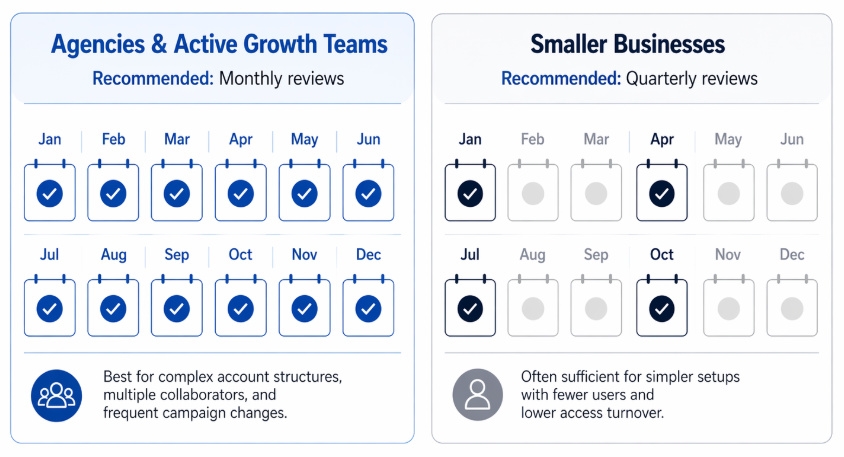
Recommended permission-audit cadence: monthly for fast-moving agency or growth environments, quarterly for smaller businesses with less access complexity
- Start with the asset group, not the person.
- Confirm which assets belong in the group. Then decide which role needs access.
- Use the least access that still allows the person to complete the work. A contractor building campaign drafts may not need finance access. A reporting analyst may not need campaign-editing permissions. A creative partner may not need full ad account control.
- Create an access checklist for every new employee, agency, or freelancer. Include business portfolio, asset group, ad account, Page, Instagram account, data source, and reporting access.
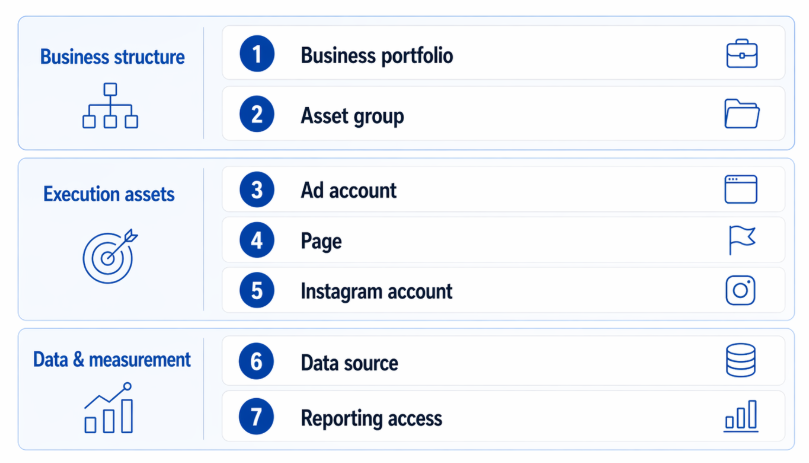
A structured access handoff should verify seven core permission points before an employee, agency, or freelancer begins campaign work
- Review access on a schedule. Monthly reviews work well for agencies and active growth teams. Quarterly may be enough for smaller businesses.
- Use LeadEnforce audience projects with clear ownership. For example, assign one person to source Facebook group audiences, another to review Instagram profile relevance, and a media buyer to activate approved audience segments.
- If the access issue appears because your team is trying to create more ad accounts than Meta allows, review Can’t Create a New Meta Ad Account? Keep Testing Moving Without Multiplying Accounts. The answer may be better structure and audience testing, not another account.
Final takeaway
Adding people to business asset groups is about controlled speed.
Paid social teams need access to launch, test, and optimize campaigns. But access should match the person’s role, the asset group’s purpose, and the business’s risk tolerance.