Running Meta campaigns often feels unpredictable. You test audiences, adjust budgets, and refine creatives, yet results fluctuate. Weak prospecting signals are often the root cause.
Event data gives you stronger signals. Instead of relying on assumed interests, you rely on real actions. This makes prospecting more stable and measurable.
In this article, you’ll learn how event data works, which events matter most, and how to structure them for prospecting.
What Event Data Means in Meta Campaigns
Event data refers to actions users take on your website or app. These actions are tracked through the Meta Pixel or Conversions API.
Common events include page views, add-to-cart actions, checkouts, and purchases. Each event signals a different level of intent.
If you are unsure whether tracking is configured correctly, start with How to Create Facebook Pixel and Track Conversions and then review The Complete Guide to Facebook Pixel Setup and Optimization.
When someone views a product once, intent is low. When someone adds to cart or starts checkout, intent increases. Prospecting improves when you prioritize stronger signals.
Where to Find and Verify Your Events
Before using event data for prospecting, confirm that tracking works correctly.
Open Events Manager inside Meta Business Manager and review:
-
Which events are firing.
-
How often each event is triggered.
-
Whether purchase values are passed correctly.
-
Whether duplicate events are recorded.
-
Whether any important events are missing.
Clean tracking is the foundation of reliable audience modeling.
Which Events Work Best for Prospecting
Not all events deserve equal weight. Some actions reflect casual browsing, while others show clear buying intent.
High-intent events often include:
-
Multiple product views within a short period.
-
AddToCart without completed purchase.
-
InitiateCheckout without payment.
-
Purchases above average order value.
-
Detailed lead form submissions.
These segments create stronger lookalike audiences. They reflect real commercial behavior instead of surface engagement.
If you want a deeper look at seed quality and scaling, read The Ultimate Guide to Facebook Lookalike Audiences.
How to Structure Event Data for Better Lookalikes
Collecting events is only the first step. The way you organize them determines modeling quality.
For a broader framework on behavioral segmentation, see How to Build Audiences from On-Site Behavior.
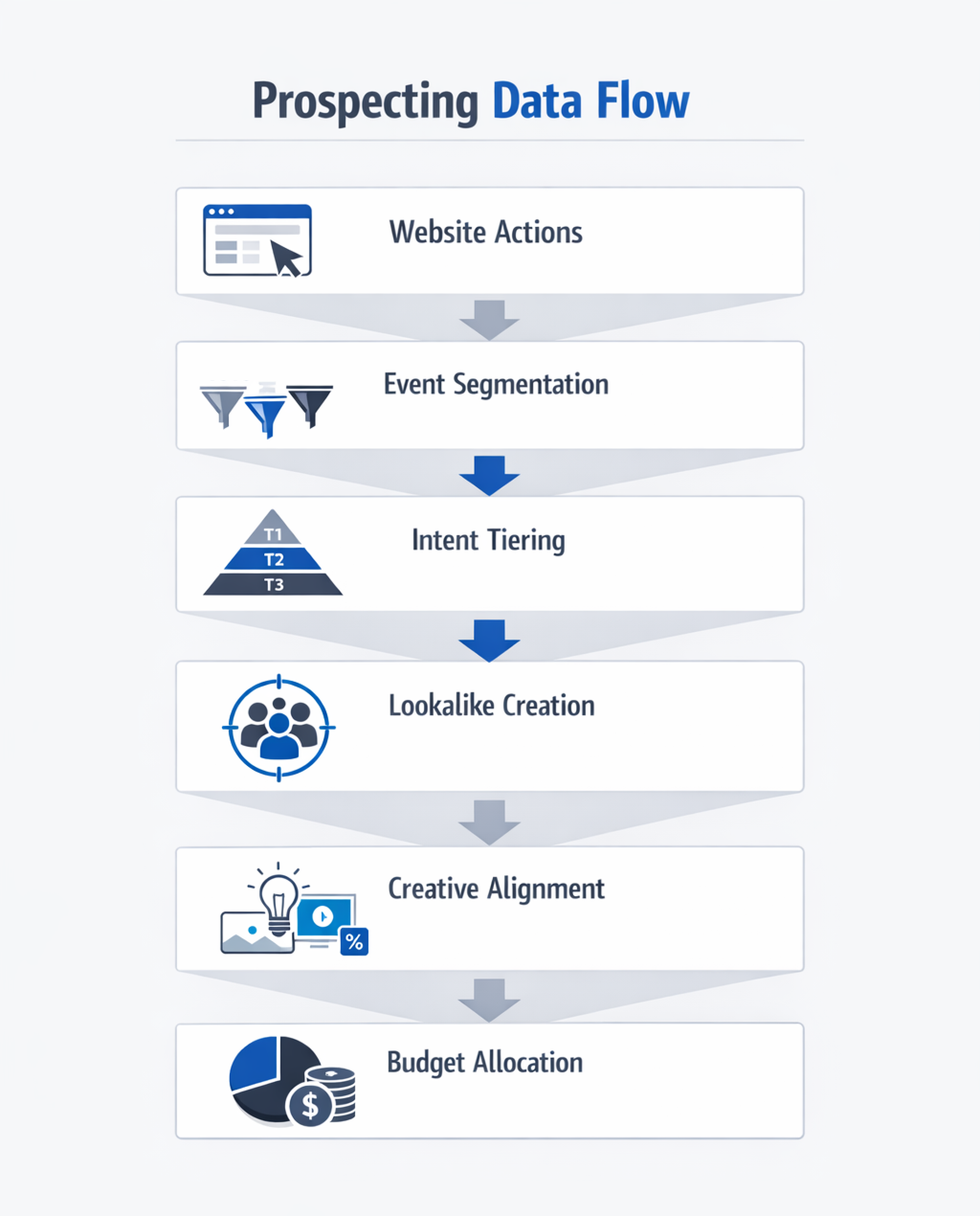
Segment by Funnel Stage
Avoid placing all visitors into one audience. Separate users based on how far they moved in the buying process.
You can create segments such as:
-
Repeat product viewers.
-
Cart users without checkout.
-
Checkout users without purchase.
-
Repeat or high-value customers.
Each segment represents a different intent level. Build separate lookalikes for each one.
Use Clear Time Windows
Recency directly affects intent strength. Recent checkout activity signals higher purchase probability than older activity.
Use shorter windows for cart and checkout events. Use longer windows for product viewers if volume is limited. Keep timeframes consistent within each audience.
Pass Accurate Purchase Value
Meta can optimize toward higher-value customers when revenue data is available. Without value parameters, all purchases appear identical.
Ensure every Purchase event includes correct transaction value. Separate premium buyers from entry-level buyers when possible. Their lookalikes behave differently in acquisition campaigns.
Combining Event Data With Audience Research
Event data shows how users behave on your site. Audience research shows where similar users spend time.
LeadEnforce allows you to build audiences from followers of Facebook groups and Instagram accounts. These users actively engage with specific topics or industries. When combined with event insights, prospecting becomes more focused.
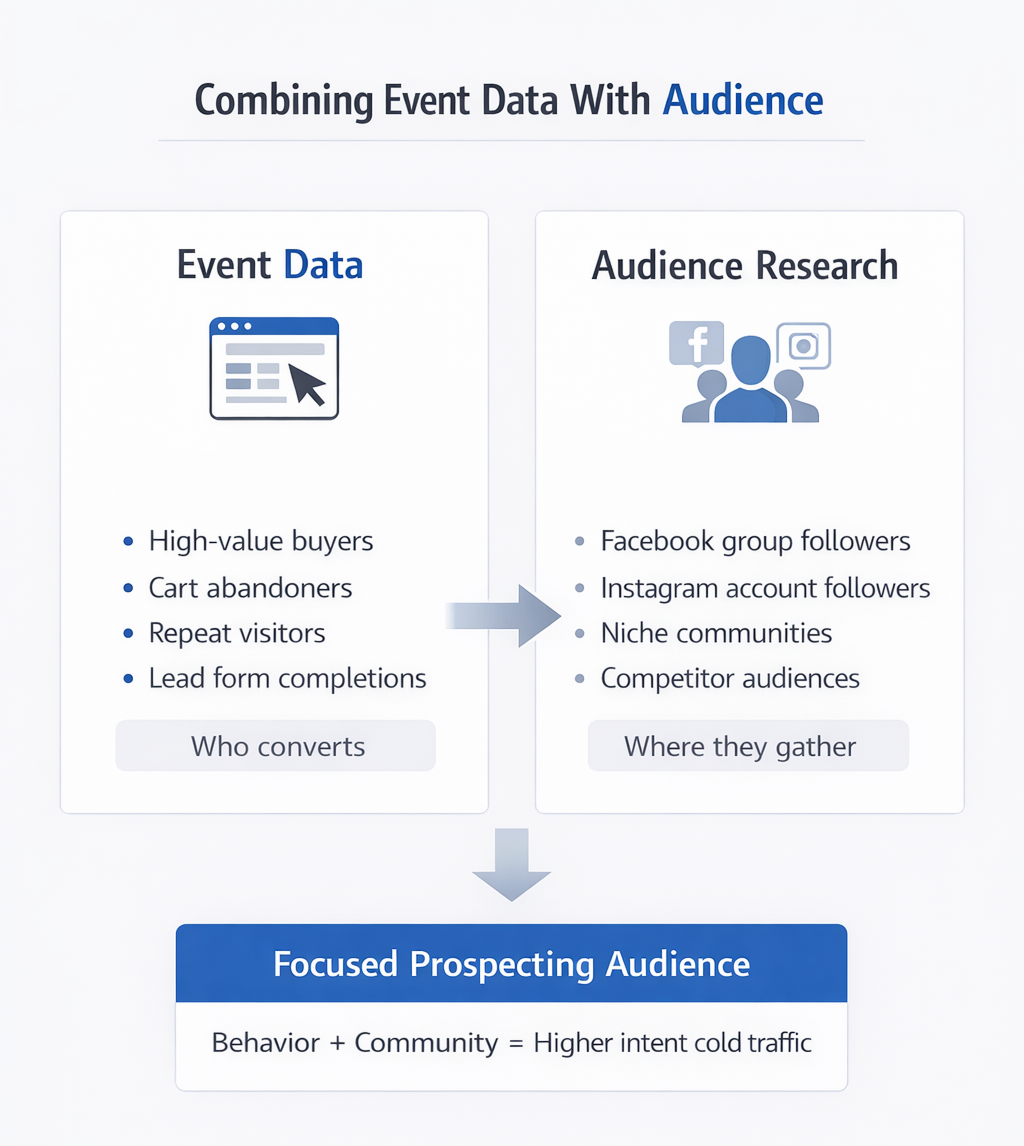
A structured workflow looks like this:
-
Identify your strongest customer segments from event data.
-
Find relevant communities connected to those segments.
-
Build custom audiences from those community followers.
-
Launch prospecting campaigns aligned with intent depth.
This connects real purchase behavior with visible interest patterns.
Using Event Tiers to Control Budget Allocation
Stronger intent should receive more budget. A clear tier structure simplifies allocation decisions.
Create Intent Tiers
Group your events by behavioral strength.
-
Tier 1: High-value purchases.
-
Tier 2: InitiateCheckout and AddToCart.
-
Tier 3: Multiple product views.
Build separate lookalikes from each tier. Allocate higher budgets to stronger intent tiers.
Exclude Active Buyers
Prospecting should focus on new potential customers. Always exclude recent purchasers and active cart users.
This prevents overlap with retargeting campaigns. It also keeps acquisition metrics accurate.
Match Creative to Behavior
Ad messaging should reflect the behavior of the source audience. Checkout-based lookalikes respond better to direct offers. Product-view lookalikes require stronger education and proof.
When creative aligns with intent level, performance becomes more consistent.
Measuring Event-Based Prospecting Results
Compare event-based lookalikes with interest-based targeting. Evaluate performance over consistent timeframes.
Focus on:
-
Cost per purchase.
-
Return on ad spend.
-
Percentage of new customers.
-
Average order value.
Analyze trends instead of daily fluctuations. Prospecting performance requires stable evaluation periods.
Final Thoughts
Prospecting improves when campaigns rely on real actions instead of assumptions. Event data provides clearer signals about who is likely to convert.
Segment by intent, control recency, pass accurate value data, and maintain clean tracking. A structured event strategy leads to more predictable Meta acquisition results.